
QuaddictedTool

Motorboy

Member
Jun 30, 2023
51
20
8
Ukraine
Motorboy submitted a new resource:

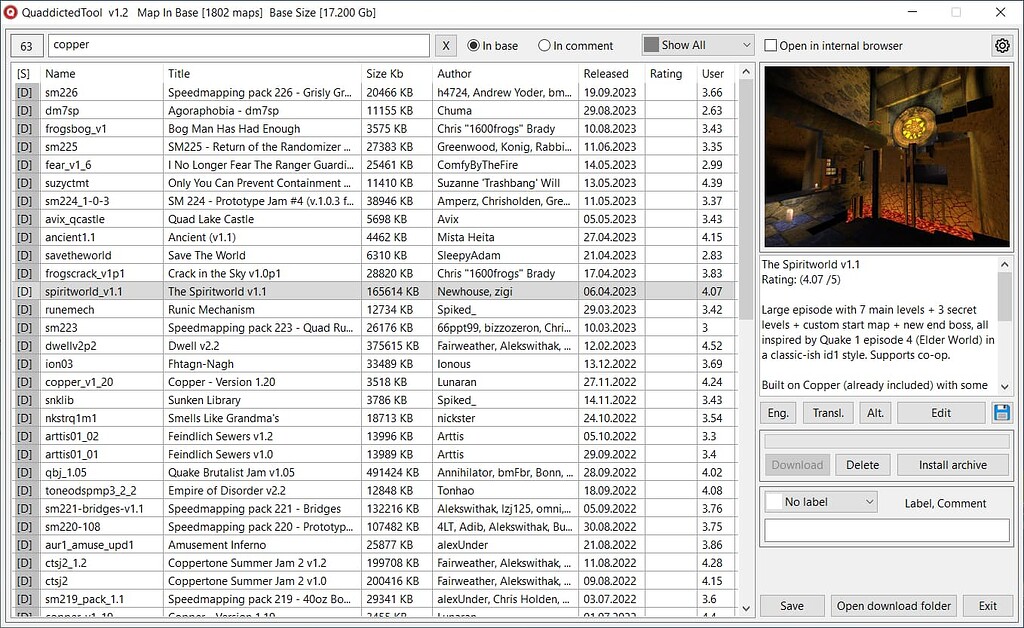
QuaddictedTool - A utility for viewing and downloading maps from the quaddicted.com website

Utility for viewing and downloading maps from the quaddicted.com website.

You can add colored labels, comments, an alternative description (you can use it for your notes, for example) to each map-mod.
Ability to sort the database by name, title, size, author, date, rating.
Ability to search by name, title, author, tag. Possibility of searching in comments.

Automatic translation of describtion of maps and mods through Google Translator.
Languages of translation: Spanish, Italian, German...

Read more about this resource...
 
Sometimes I have stupid ideas like this:
- download all maps/mods from Quaddicted,
- buy Blu-Ray recorder, 100GB M-Disc disk (25GB are better for storing important data, but this would be only a backup of what's already on Internet) or two,
- buy DVD case (maybe bulk of 30 just in case so it is cheaper),
- print cover for DVD case (with info that's not for sale), maybe booklet inside, own Blu-Ray disk cover (there are disks sold with blank covers that special printers can put something there, another solution is to buy printable stickers, but heard that they might fall off while spinning).
And probably add 1 DVD every year with updates. Probably I'd add there some engines, configs and music and other things as an any archivist would do. But then moddb...

// For writing custom launcher this is an interesting idea: https://github.com/adbrt/cb-legacy-dev
 
Last edited:
Thank you for producing these utilities. However, could you upload the code to a GitHub page?
 
The source code of the utilities can be downloaded here.

QMLauncher
QuaddictedTool
 
Motorboy updated QuaddictedTool with a new update entry:

QuaddictedTool v1.2.2

v1.2.2
The algorithm for detecting installed archives has been redone. Now if in QMLauncher several archives are installed in one folder or the archive is installed in an already existing folder - they are all displayed as installed. (QMLaunch v1.7.1 or newer is required).
A newer version of the compiler is used to compile the utility. Now the Microsoft antivirus does not identify the utility as malware.

If you use the utility together with QMLauncher - update QMLauncher to version 1.7.1.

Read the rest of this update entry...
 
Motorboy updated QuaddictedTool with a new update entry:

QuaddictedTool v1.2.3

Today I checked the quaddictedtool utility on virustotal and was surprised to find that 22 antiviruses found malicious code in it. At the time of download, only 5 antiviruses detected malicious code. Therefore, I compiled the utility using a 64-bit compiler. Now on VirusTotal, only four antiviruses identify the utility as malicious (x64). (Any program written in PureBasic is identified by these antiviruses as malicious).
No changes were made to the utility. The version was just changed to...

Read the rest of this update entry...
 
Motorboy updated QuaddictedTool with a new update entry:

Version 2.0

The utility is adapted to the new json database of the site.
Now you can change the window size.
You can add your own rating for the maps.
The new json database of the site does not have maps ratings. Therefore, the ratings are loaded from the maps page.
You can run the utility without downloading the database from the Internet by holding the LeftShift key when starting.
Some changes have been made to the interface.

!!! Do not install version 2.0 in the folder with the previous version of...

Read the rest of this update entry...
 
Attention!!! Do not delete the file "QuaddictedToolUserData.qdb" from the previous version of QuaddictedTool v1.2.3. The Quaddicted JSON database will be changed soon. Most likely, after this, your data will disappear from QuaddictedTool 2.0. I will make changes to the program, and you will need to re-import the data into the new version of QuaddictedTool.
 
Motorboy updated QuaddictedTool with a new update entry:

QuaddictedTool v2.1

Now if new maps have appeared in the Quaddicted database, the utility will notify you about it when you launch it.
Expanded search capabilities in the database. Now you can search in notes, original description, translation of the description. For example, if you want to find all maps for Arcane Dimensions, Copper, etc., select search in the English description and enter Arcane Dimensions or Copper. All maps for these mods will be shown.
Now you can interrupt the download of the Quaddicted...

Read the rest of this update entry...
 
Motorboy updated QuaddictedTool with a new update entry:

Version 2.2

Version 2.2

The utility has been adapted to the new version of the site API. I hope there will be no more changes to the API...
Fixed the problem with loading some archives.
Added a checkbox to the left of the search bar "Search only after pressing Enter". It can help with slowdowns when entering from the keyboard on weak processors.
Added the ability to change the saturation of color labels for maps (in the settings).
Added a button to launch QMLauncher from QuaddictedTool. The path to...

Read the rest of this update entry...
 
Motorboy updated QuaddictedTool with a new update entry:

QuaddictedTool v2.3

Added icons to indicate downloaded/installed archives (see screenshot ).
Corrections have been made to the code to preserve user data (tags, comments, ratings, notes, etc.) when there are errors downloading the database from the Quaddicted website. If you use labels, comments, ratings, notes, etc., I recommend updating the utility to version 2.3+.
To launch the utility without downloading the database from the internet, hold down the Shift or CTRL key while launching.

Read the rest of this update entry...
 
Motorboy updated QuaddictedTool with a new update entry:

QuaddictedTool v2.3.5

Added an option to disable loading the database each time the utility is launched (enabled in the settings). The database is updated very infrequently. There's no point in loading it every time, especially if you have a slow internet connection.
You can update the database manually. Click the update button in the upper right corner and select "Update Database."
Minor bug fixes and optimizations.

Read the rest of this update entry...